• Home
    • Features
    • Testimonials
  • Download
  • How to
    • Blog
    • Help >
      • Videos tutorials
      • Quick Start >
        • How to get songbooks
        • How to get Bibles
        • How to display song lyrics and Bible verses
        • How to import songs and Bibles from other sources
        • How to add/edit songs and announcements
      • Main features
      • Why two modes
      • “Viewer” mode >
        • Songbooks and Bibles
        • The agenda
        • The slides
        • The preview area
        • The keyboard shortcuts
      • Search for >
        • Songs
        • Bible verses
      • Display >
        • A slideshow
        • A PowerPoint
        • A video
      • “Edit” mode >
        • Hierarchical styles
        • Style explorer
        • Edit a song
      • Screen resolution and ratio
      • Import assistant
  • Forum
  • Contact
  • About

VideoPsalm


How to vertically center the lyrics

7/18/2014

7 Comments

 
By default, the lyrics are displayed at the top of the slide.
To make the default display to have the lyrics centered as opposed to being on top, follow these steps:

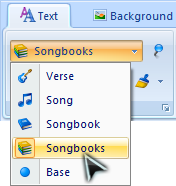
1. Select the “Songbooks” style level, either by clicking on the “Songbooks” button, to the left of the “Bibles” button, or by picking this style level from the drop-down in the ribbon:

Photo
Click the “Songbooks” button
or
Photo
Select the “Songbooks” style level in the drop-down
This will tell VideoPsalm that any subsequent style change will take place at the “Songbooks” style level.

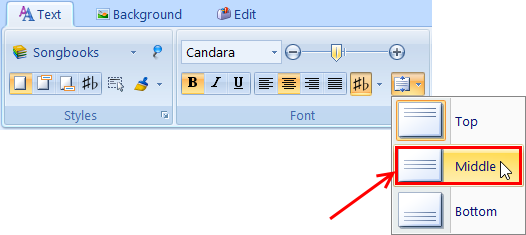
2. Click on the “Middle” vertical alignment option in the corresponding drop-down:
Photo
This will tell VideoPsalm to vertically align all song verses from all songs from all songbooks (unless specified differently at a higher level).

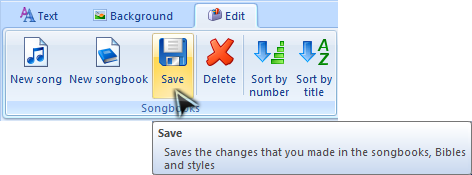
3. Save your changes:
Photo
and you are done.

Learn more about VideoPsalm's hierarchical styles here:
  • How to assign a background to a song verse or to the whole song - Hierarchical styles part two
  • How to change the background of a song or a whole songbook - Hierarchical styles part one
  • How to adjust slide text margins

or use the contact form.
7 Comments
Harlie
5/11/2016 02:52:50 pm

I just downloaded VideoPsalm last week, and I am trying to learn everything. I think that the countdown clock is a neat feature, but I do not know how to get it to work. Also, the clock does not show the correct time when I display it.
Thank you

Reply
VideoPsalm link
9/8/2018 08:39:34 am

Hi Harlie,

To show or hide the clock / countdown / timer, use the controls located in the "Message" tab.

Please accept my apologies for the delay in responding.
These forums are not systematically monitored.
If you need a timely answer, it is always better to contact VideoPsalm through its gmail email address.

Reply
Vonne
9/8/2018 08:09:02 am

Hi,

I cant make the vertically centered position for songbooks. :(

Please help.

Thanks,

Reply
VideoPsalm link
9/8/2018 08:35:13 am

Hi Vonne,

Thank you for your feedback.

VideoPsalm uses the concept of cascading style attributes, enabling you to define in a few clicks any style attribute at any level : song verse, song, songbook, all songbooks, base.

Please let me know if the following articles explain well enough how to make best use of cascading styles:

How to change the background of a song or a whole songbook - Cascading styles part one
http://myvideopsalm.weebly.com/1/post/2012/02/first-post.html

How to assign a background to a song verse or to the whole song - Cascading styles part two
http://myvideopsalm.weebly.com/1/post/2013/12/how-to-assign-a-background-to-a-song-verse-or-to-the-whole-song-hierarchical-styles.html

Three methods to display a background/logo between two songs
http://myvideopsalm.weebly.com/blog/three-methods-to-display-a-backgroundlogo-between-two-songs

How to remove an image assigned to a song verse
http://myvideopsalm.weebly.com/blog/how-to-remove-an-image-assigned-to-a-song-verse


If you experience further problems, feel free to send me an agenda file (a .vpagd file) at my gmail address. This will enable me to give you personalized instructions on how to get this to work for you.

Reply
Amber link
10/7/2018 08:34:11 pm

Thank you for sharing the quick guide. These tutorials are very helpful for me to get going.

Reply
Amber Vashisht link
10/7/2018 08:36:42 pm

The above tutorial for centering the lyrics is informative and helpful. Keep sharing such quick guides. Appreciate your work. Thank you.

Reply
Michael Lee
12/7/2024 09:40:19 am

I’ve just upgraded to VideoPsalms 1.27 but cannot find the ‘text box’ feature which allows me to position text anywhere on the slide?

Reply


Leave a Reply.

    Categories

    All
    Bible
    Bilingual
    CCLI
    Language
    SongSelect
    Translation

    Archives

    December 2022
    August 2022
    June 2022
    March 2022
    February 2022
    January 2022
    December 2021
    April 2021
    July 2020
    June 2020
    May 2020
    December 2018
    August 2017
    July 2017
    January 2017
    October 2016
    July 2016
    June 2016
    July 2015
    June 2015
    May 2015
    February 2015
    January 2015
    November 2014
    September 2014
    July 2014
    June 2014
    May 2014
    April 2014
    March 2014
    December 2013
    November 2013
    September 2013
    August 2013
    June 2013
    May 2013
    April 2013
    February 2012

    RSS Feed

Powered by Create your own unique website with customizable templates.